
Accelerate DX with Excel Workflow Visualization and Automation | How to Achieve It with the No-Code Tool SheetFlash
 By Yuto Saizen
September 17, 2024
SheetFlash Product
By Yuto Saizen
September 17, 2024
SheetFlash Product

Introduction: Challenges of Daily Excel Routine Tasks
Excessive Time Consumption and Risk of Errors
In many companies, tasks like data entry, aggregation, and report generation in Excel are performed daily. These tasks are not only time-consuming but also prone to human error, posing significant challenges. This leads to a decline in overall productivity, and as businesses drive digital transformation (DX), inefficient manual tasks stand as a major hurdle.
Challenges in Handing Over Tasks
Additionally, manual processes often lead to problems when handing over tasks. Individually tailored files and custom formulas are difficult for other team members to understand, resulting in extended handover times and a reduction in overall team efficiency.
What is an Excel Workflow?
Definition of an Excel Workflow
An Excel workflow refers to the process of systematically organizing and automating a series of tasks in Excel for more efficient management. Whether it’s data entry, aggregation, or report generation, workflows allow these processes to be organized, providing clear visibility into the overall flow of work.
Workflow Visualization
Visualization refers to organizing and displaying tasks in Excel in a way that makes it easy to see where errors might occur and which steps are consuming the most time. By doing this, bottlenecks in the workflow can be identified, and the groundwork for automation can be laid.
Why is Excel Workflow Management Not Common?
The Complexity of Diverse Excel Tasks
One of the reasons why Excel workflow management is not widely adopted is the diversity of tasks performed by different users. Standardizing or automating these tasks can be difficult, as the workflows vary significantly from one company to another. Traditional automation approaches often hit limits when dealing with such variability.
Prioritization in Digital Transformation (DX)
When companies pursue DX, they often focus first on areas that have a significant impact. A typical DX process involves workflow interviews, visualization, system design, and database setup, but outsourcing these steps can lead to significant costs. As a result, Excel tasks are often deprioritized and left behind in the DX process.
How to Understand Your Excel Workflow
Breaking Down Tasks
The first step in understanding your Excel workflow is to break daily tasks down into smaller steps. By doing this, it becomes easier to grasp the entire process and identify which parts are suitable for automation.
Identifying Repetitive Tasks
Another crucial step is to identify repetitive tasks within your workflow and turn them into templates. This allows for more efficient management of workflows, especially in cases where the same data processing or aggregation is performed repeatedly.
Setting Priorities
By identifying time-consuming or error-prone tasks, you can prioritize which parts of the workflow should be automated first. This helps drive overall efficiency, offering higher ROI through targeted automation.
Benefits of Clearly Defined Excel Workflows
Task Visualization and Progress Management
By clearly defining Excel workflows, you can easily track the progress of each task and manage the workflow more efficiently. It also enables smoother team communication, as everyone can see who is responsible for each step and how far along the process is.
Reducing Errors and Improving Quality
Standardizing and automating workflows significantly reduces manual errors, enhancing the consistency and quality of your work. Tasks such as data entry and aggregation, which are prone to human error, can be automatically executed with precision.
Cost Reduction and Improved Efficiency
By eliminating manual tasks, you can reduce labor costs. As time-consuming processes are streamlined, employees can focus on higher-value tasks, improving overall operational efficiency.
Smoother Task Handover
Workflow visualization also ensures standardization, making it easier to hand over tasks when there is a personnel change. With clear steps and automated processes, tasks can be executed consistently, making transitions smoother for the entire team.
Why SheetFlash is Widely Supported
Easy No-Code Setup
SheetFlash allows you to automate Excel workflows easily without the need for coding. As a no-code tool, it enables users without programming knowledge to create and manage workflows through an intuitive interface.
Cost-Effective
Instead of outsourcing system setup, companies can manage and automate workflows internally with SheetFlash, leading to substantial cost savings. Additionally, since it can be implemented and operated in a short time, it quickly enhances operational efficiency across the company.
Intuitive and Visual Management
With SheetFlash, you can build workflows using simple drag-and-drop functionality. Each action can be customized with clear titles, making it easy to organize tasks and share workflows across the team.
Tips for Creating Excel Workflows with SheetFlash
Start Small and Scale
Begin by automating smaller tasks and gradually scale up to include larger workflows. This approach ensures that your overall workflow is optimized step by step.
Creating and Managing Projects
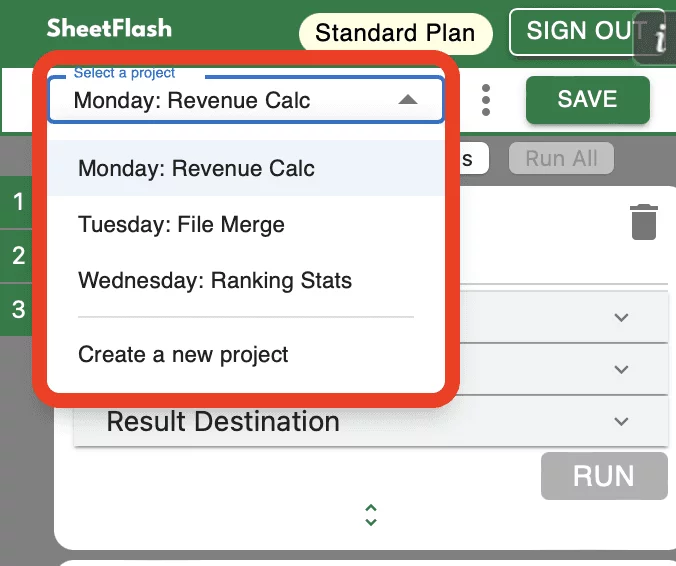
In SheetFlash, workflows are managed within Projects. A Project functions like a folder that holds and organizes specific workflows or a series of tasks. For example, you could store a monthly reporting workflow or a department-specific process as a Project, making it easy to retrieve and reuse these workflows when needed.
By creating multiple Projects, you can categorize workflows according to their purpose, making management more streamlined.
Adding and Customizing Action Cards
Within each workflow in SheetFlash, actions are represented by Action Cards. An Action Card visually depicts a single task executed in Excel, such as filtering data, adding rows or columns, or applying specific formulas. Each card represents an essential step in the overall workflow process.
Visual Management with Drag-and-Drop
One of SheetFlash's key features is its drag-and-drop functionality, which allows you to effortlessly rearrange Action Cards within the workflow. By dragging and dropping, you can adjust the sequence of tasks in real-time to fit your process requirements. This flexibility enables you to fine-tune workflows quickly without needing to rebuild them from scratch.
Customizing Card Titles
Each Action Card allows you to modify its title, helping you clearly define the action it performs within the workflow. Custom titles make it easy to identify each card's specific task, ensuring that even complex workflows remain organized and intuitive to manage.
Easy Setup with Button Clicks
Setting up Action Cards in SheetFlash is extremely user-friendly, as most configurations can be completed with just button clicks. This eliminates the need for complex coding or manual setup, allowing users to quickly establish workflows without technical expertise.
The visual card-based system makes it easy to manage and monitor your workflow. You can track progress, view each action at a glance, and ensure that the workflow is operating as intended from start to finish.
Real-Time Progress Tracking and Timeline Management
SheetFlash provides real-time tracking of your workflow's progress, allowing you to manage timelines efficiently and make adjustments as needed to ensure timely task completion.
Accelerate DX by Visualizing and Automating Employee and Team Excel Workflows with SheetFlash
Automating Excel Workflows to Reduce Work Time by 95%
With SheetFlash, you can easily automate and visualize complex, time-consuming tasks performed by employees and team members. Routine tasks such as creating monthly reports or updating daily data can be completed in just minutes, reducing work time by up to 95%. This automation allows employees to focus more on strategic tasks, significantly improving team-wide efficiency.
Visualizing and Centralizing Excel Workflows to Drive DX
As companies push forward with digital transformation (DX), automating and visualizing workflows is key to dramatically improving efficiency and productivity. By leveraging SheetFlash, you can eliminate repetitive manual tasks, streamline operations, and centralize workflows across the team. This centralized management accelerates DX and helps companies achieve greater operational success.
“Automate your workflows with SheetFlash and start optimizing your business operations while driving DX today!”